

Font
Fonts for titles and on-screen graphics should adhere to the brand standards established for print and online materials. In order to maintain brand integrity, one of the following two fonts should be utilized within multimedia productions.
Avenir

Arial

Lower Thirds
Lower thirds are on-screen graphics used to identify a subject and are typically placed in the bottom half of the screen. For Campbell University multimedia productions, lower third graphics should appear in white text, utilizing either the Avenir or Arial fonts. They should also be written using upper and lower case letters.
When identifying a subject by their name and title, the lower third graphic should span multiple lines of text. Also, the font used to identify their name should appear in a heavier weight and size than the font used to identify their title.
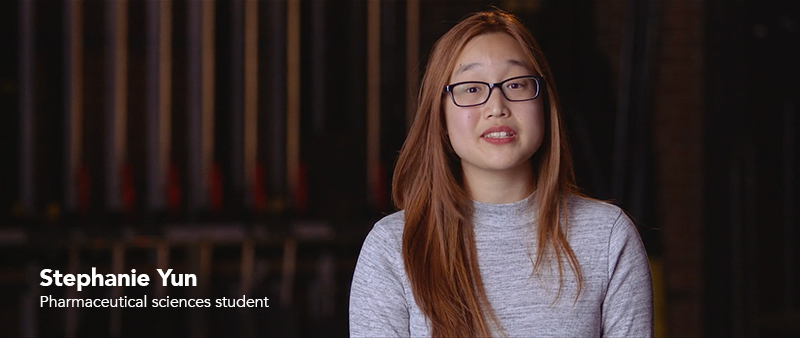
Example:

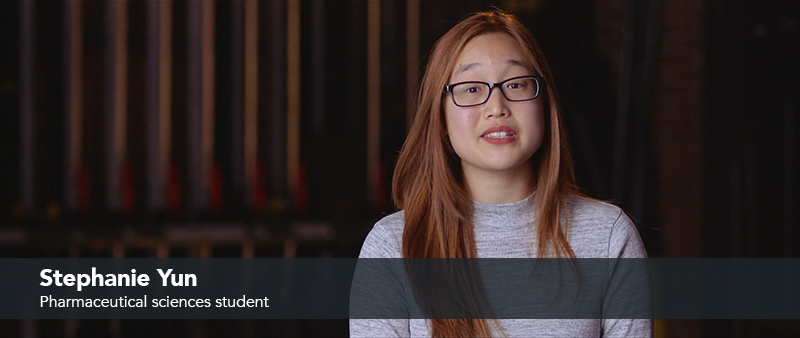
Lower thirds with black bar
In the event that the background is too bright to distinguish white text, a black bar may used as a separation element. The color values for the black bar should adhere to the overall brand standards:
Core Black
- RGB: 0, 0, 0
- Hex: #1E252B
When compositing a black bar into video, opacity should be set at 80%.
Video Bumper
In order to establish strong brand recognition, Campbell University videos should conclude with the Campbell wordmark.

Preferred version: Campbell University workmark, white logo on orange background
Video Bumper with Text
In certain scenarios, information such as a URL or hashtag may be used at the end of videos to encourage and direct viewers. This information can be integrated into the video itself or exist on its own screen. If it is coupled with the Campbell wordmark, however, it must adhere to the following guidelines.
Text accompanying the Campbell wordmark at the end of videos must use either the Avenir or Arial fonts. The minimum distance between the text and the Campbell wordmark must be equivalent to the height of “U” in the Campbell wordmark.

Campbell University wordmark and text
Aspect Ratios & Formats
Most Campbell videos are now watched on a phone, within a social feed. Producing every video in a single 16:9 master and cropping it later leaves subjects off-center and text cut off. Plan the aspect ratio before you shoot, and frame with the final placement in mind.
16:9 (horizontal) — 1920×1080
The standard for YouTube, Vimeo, embedded web video, and presentations. Use for long-form storytelling, interviews, and event recap pieces.
9:16 (vertical) — 1080×1920
The standard for Instagram Reels, TikTok, YouTube Shorts, and Stories. Shoot vertical natively when the piece is destined for these platforms; do not upscale a horizontal crop. Keep subjects centered and leave room at top and bottom for platform interface elements (see Safe Areas below).
1:1 (square) — 1080×1080
A flexible in-feed format for Instagram and Facebook. Useful when one asset needs to work across multiple placements without re-editing.
4:5 (portrait) — 1080×1350
The tallest format that displays full-size in the Instagram and Facebook feed without being cropped to square. Use it for in-feed posts when you want maximum vertical real estate — it commands more screen space than 1:1 while still living in the main feed rather than Stories or Reels.
When a story will run in more than one place, shoot with the tightest crop in mind — frame the subject so the 9:16 version still works, then widen for 16:9 in the edit.
Captions & Accessibility
Captions are required on Campbell video, not optional. The majority of social video is watched with the sound off, and captions are also an accessibility requirement consistent with the University’s web accessibility commitment.
Platform (closed) captions — preferred for web and YouTube.
Upload a caption file (.srt or .vtt) so viewers can toggle captions on or off. This keeps the video frame clean and gives the most accessible experience. Auto-generated captions must be reviewed and corrected before publishing — names, program titles, and Campbell-specific terms are frequently transcribed wrong.
Burned-in (open) captions — preferred for social feeds.
For Reels, TikTok, and Stories, burn captions into the video so they display automatically. Set captions in Avenir or Arial [pending refresh typography], white text with a subtle shadow or semi-transparent bar behind them for legibility. Keep them within the safe area, not at the extreme bottom where platform UI covers them.
Contrast. Caption and on-screen text must remain legible against the background at all times. When footage is bright or busy, add the semi-transparent bar (see Lower Thirds). Aim for strong contrast between text and background so text is readable on a small screen in daylight.
Safe Areas & Export Specs
Safe areas. Keep essential elements — text, logos, faces, lower thirds — inside a safe margin so nothing critical is cropped or hidden by platform interface. As a working rule, keep important content within the center ~80% of the frame, away from all four edges. On vertical video specifically, keep the top ~15% and bottom ~20% clear of text, since captions, usernames, and buttons sit there.
Container / codec: MP4, H.264
Resolution: 1080p minimum (1920×1080 for 16:9; 1080×1920 for 9:16; 1080×1080 for 1:1)
Frame rate: match the source — typically 24, 30, or 60 fps; keep it consistent throughout a piece
Audio: AAC, stereo, dialogue mixed to a consistent, comfortable level
Export at the target aspect ratio’s native resolution rather than exporting a single master and letting the platform crop it.
Music & Licensing
Every piece of music, sound effect, and stock element in a Campbell video must be properly licensed for the University’s use. Do not pull audio from streaming services, YouTube, or any source you don’t hold rights to — an unlicensed track can trigger takedowns, muted audio, or copyright claims, and exposes the University to liability.
Use tracks from a licensed library the University subscribes to, original/commissioned music, or audio explicitly cleared for the intended use. Keep a record of the license or source for each track in case usage is ever questioned. If you’re unsure whether something is cleared, treat it as not cleared and check before publishing. When in doubt, contact University Communications & Marketing.
Video Examples
Because of powerful emotional connections and stunning visuals, some Campbell stories are best told through multimedia. We have included a sampling of videos from the Campbell University Vimeo page.

Find yourself at Campbell University
Campbell University provides students with roots and wings – roots to keep them grounded and wings so they ascend. This prepares them to lead with purpose.
Videography Services
The University’s Communications & Marketing department is committed to helping provide video services to support the recruitment, marketing, and communication needs of Campbell University.